SyncM8 Support & Guide
Connect ServiceM8 with your CRM: fire workflows from ServiceM8 events, and create or update ServiceM8 records from your workflows.
Installing
SyncM8 can be installed at the agency level (across all sub-accounts) or directly on a single sub-account. ServiceM8 is always connected inside a sub-account.
Agency install - finish setup in each sub-account
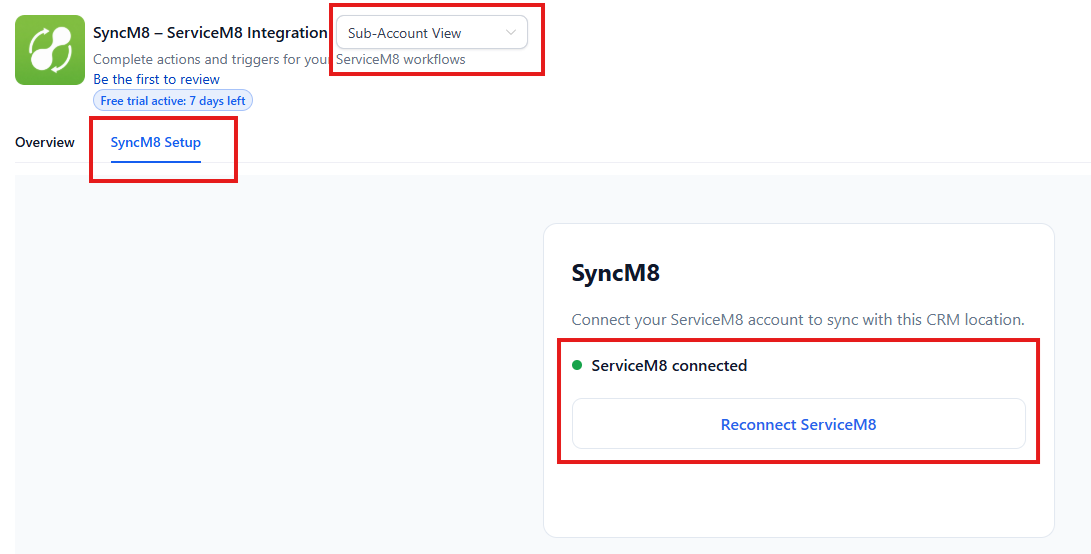
An agency-wide install enables SyncM8 everywhere, but ServiceM8 is connected per location. After installing at the agency level:
- Go back to your CRM and open the sub-account you want to connect.
- Open the SyncM8 app.
- If the view shows Agency View, switch it to Sub-Account View (top-right dropdown).
- Open the SyncM8 Setup tab.
- Click Connect ServiceM8 and authorise the account.
Sub-account install
Install SyncM8 on the sub-account, open the SyncM8 Setup tab, and click Connect ServiceM8.
Using SyncM8
Triggers (ServiceM8 → your CRM)
Add the SyncM8 trigger to a workflow and choose a Webhook Event Type (e.g. job.completed, job.status_changed, proposal.viewed, form.response_created). When that event happens in ServiceM8, your workflow runs with these variables available:
- Event:
event_type,record_uuid,event_id,received_at_iso - Job:
job_uuid,job_number,job_address,job_description,job_total,status,job_scheduled_start,job_scheduled_end - Customer:
company_uuid,company_name - Contact:
contact_first_name,contact_last_name,contact_email,contact_phone,contact_mobile - Proposal:
proposal_uuid,proposal_sent_at,proposal_viewed_at,proposal_accepted_at - Attachment / form:
attachment_url,attachment_name,form_uuid,form_field_data - Full payload:
raw_json(everything ServiceM8 sent - see Custom enrichment)
Fields that don't apply to an event arrive empty (e.g. proposal_* on a job event). Use the contact fields with a Find/Upsert Contact step to attach the workflow to a contact.
Values for fixed-option fields
A few fields only ever hold one of a fixed set of values. Use these exact strings in If/Else conditions - they're case- and space-sensitive, so you don't have to send a test event to find out what they look like:
| Field | Possible values (exact) |
|---|---|
status (job status) | Quote, Work Order, Completed, Unsuccessful |
Two gotchas worth calling out: a cancelled or rejected job reports Unsuccessful - ServiceM8 has no separate "Cancelled" status. And the value is the full display string exactly as shown - Work Order (capitalised, with a space), never work_order or W.
The event type itself (event_type, and evt.type inside raw_json) is always one of these exact values - use them verbatim in an If/Else or Custom Code branch:
| Group | Event types (exact) |
|---|---|
| Job | job.created, job.updated, job.status_changed, job.queued, job.completed, job.checked_in, job.checked_out, job.quote_sent, job.quote_accepted, job.invoice_sent, job.invoice_paid, job.review_received, job.note_added, job.photo_added, job.video_added, job.badge_added, job.badge_removed |
| Customer | company.created, company.updated |
| Proposal | proposal.sent, proposal.viewed |
| Staff | staff.clocked_on, staff.clocked_off |
| Form | form.response_created |
| Inbox | inbox.message_received |
Yes/no fields - any true/false flag you read from raw_json (e.g. a record's active flag) comes through as 1 or 0, not true/false or Yes/No.
attachment_url is not empty), or check/set a value on the contact. This is the same at-least-once contract used by other webhook tools.Actions (your CRM → ServiceM8)
Add SyncM8 actions to a workflow to push data back into ServiceM8:
| Action | Returns |
|---|---|
| Create or Find Customer | company_uuid |
| Add Customer Contact | companycontact_uuid |
| Create Job | job_uuid, job_number |
| Add Job Contact | jobcontact_uuid |
| Update Job Status | status |
| Add Job Note | note_uuid |
| Get Job | current job details |
Chain them by mapping each action's output into the next - e.g. Create or Find Customer → Create Job (using company_uuid) → Add Job Contact (using job_uuid).
Custom enrichment with raw_json
SyncM8 flattens the most-used fields into variables and enriches common ones (customer, contact, job) automatically. But ServiceM8 events differ, and not every field of every event is flattened. For anything not in the variable list, the complete ServiceM8 payload is always provided in raw_json - parse it in a Custom Code (JavaScript) step to pull out exactly what you need.
1. Parse raw_json in a Custom Code step
Add a Custom Code (JavaScript) action. Map one input named raw to {{servicem8_evetns.raw_json}}, then:
// input: raw  =  {{servicem8_evetns.raw_json}}
const evt  = JSON.parse(inputData.raw);
const data = evt.data || {};
const job  = (evt.related && evt.related.job) || (data.generated_job_id ? data : {});

return {
  event_type:   evt.type || "",
  job_status:   job.status || "",
  job_total:    job.total_invoice_amount || "",
  geo_lat:      String(job.lat || ""),
  geo_lng:      String(job.lng || ""),
  // turn form answers into a readable block:
  form_answers: (() => {
    try {
      return (JSON.parse(data.field_data || "[]"))
        .map(f => f.Question + ": " + f.Response).join("\n");
    } catch (e) { return ""; }
  })()
};
The keys you return become variables you can use in later steps (e.g. {{customCode.job_status}}, {{customCode.form_answers}}).
2. Branch with If/Else
Use an If/Else condition on the event or any extracted value to route the workflow - for example:
{{servicem8_evetns.event_type}}isjob.completed→ send a review request.{{servicem8_evetns.proposal_accepted_at}}is not empty → create the job.{{customCode.job_status}}isWork Order→ notify the team.
3. Pull fresh data with an action
If you need current details that weren't in the event, call the SyncM8 Get Job action with {{servicem8_evetns.job_uuid}} to fetch the latest status, number and address mid-workflow.
attachment_url is a ready-to-fetch link to the photo, video, or completed-form PDF. Use it directly in a message/email step, or in Custom Code to download the file.FAQ
A trigger field is empty - why?
Most fields are event-specific (e.g. proposal_* only on proposal events, form_* only on form events). If a value you need isn't in the variables, it's in raw_json - see Custom enrichment.
I edited a form after submitting it - the change didn't sync.
ServiceM8 notifies SyncM8 only when a form response is first submitted, not when an existing response is edited or re-saved - it sends no event for the edit, so there's nothing for SyncM8 to forward. To make sure the final version syncs, review the form before submitting, or submit a new form response instead of editing the existing one.
My workflow isn't firing.
Confirm ServiceM8 is connected on the SyncM8 Setup tab, the workflow is Published/Live (not Draft), and the trigger's event type matches what happened in ServiceM8.
An action failed.
Re-open SyncM8 Setup and Reconnect ServiceM8 (a new permission may be required), and check the ServiceM8 account is on an active plan. Errors are reported back on the workflow step.
A photo/attachment link returns an error.
Attachment access needs an extra ServiceM8 permission - open SyncM8 Setup and Reconnect ServiceM8 once to grant it.
My workflow ran more than once for one action.
ServiceM8 intentionally emits more than one event for some actions - a completed form sends a create event and then a second event carrying the PDF, and photos can arrive twice. SyncM8 passes each distinct event through so you never miss the attachment or PDF; it only collapses an exact retry of the same delivery. If your workflow shouldn't run more than once, dedupe on your side: add an If/Else that continues only when the field you need is present (e.g. attachment_url is not empty), or check/set a value on the contact. Each event carries a distinct event_id - include those if you contact support.
Why didn't a proposal event fire?
Proposal webhook events depend on ServiceM8 emitting them for your account. SyncM8's subscription is registered and will deliver as soon as ServiceM8 sends the event.
Contact support
Email support@blackbull.ai. To help us resolve it quickly, include:
- Your CRM location ID (shown on the SyncM8 Setup page).
- The event type or action involved.
- What you expected vs. what happened (and the
event_idif it's a trigger).